
Getting Started
Follow this quick guide to invite Wamoone into your Discord server and begin setting up levelling in your server!
1. Invite Wamoone to Your Server
First, click the Invite Link to open Discord's application authorization flow. Select the server you want to add Wamoone to from the dropdown menu, then click Continue.
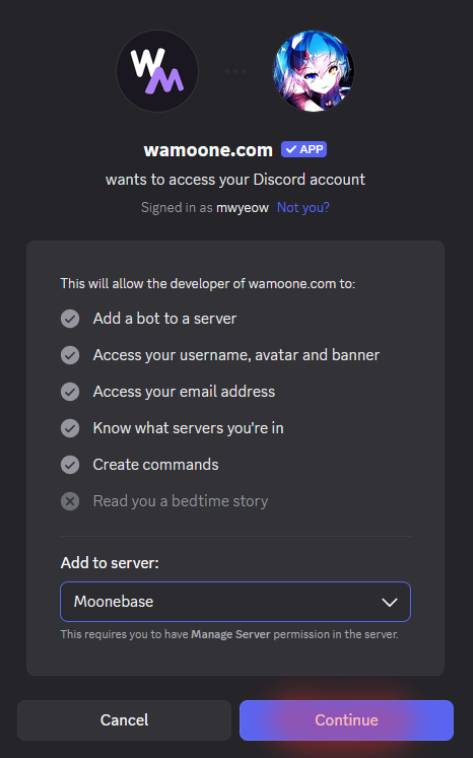 Select a server and confirm by clicking Continue
2. Review and Authorize Permissions
On the next screen, you will see an overview of all the permissions you are about to grant to Wamoone by inviting them onto the server.
You may remove permissions by clicking on the check-marks, but please only do this if you know what you're doing — some functionalities of the bot may be lost until you re-grant permissions later.
To confirm, click on Authorize.
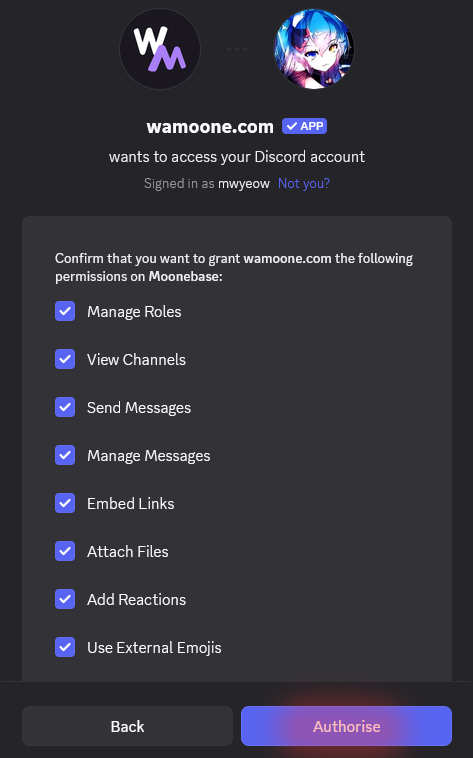 Review permissions and click Authorize
Note: You might be prompted to complete a standard CAPTCHA verification to confirm that you are not a bot. Complete the verification and proceed.
3. All Done!
Congratulations, you have added Wamoone to your server! Members can now start using commands like
/rank or leaderboard in your chats, or as an admin head over to the Dashboard to customise levelling in your server to your heart's content, all for free!